Showing posts with label Blogging. Show all posts

Question:-How to move a blogger blog from one account to another account?

Tuesday, 11 December 2012

Answer:-

  1. Sign in to Blogger with Account 1, which we'll assume is the account containing the blog.
  2. Go to the "Permissions" section under Settings | Basic tab.
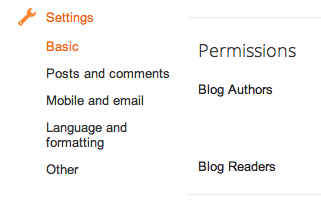
    Permissions section
  3. Click the Add Authors button and send an invitation to the owner of Account 2, the account to which you'd like to move the blog.
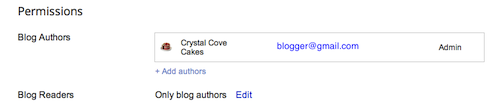
    Add authors
  4. Wait for the owner of Account 2 to accept the invitation. If you're sharing a computer, you'll need to sign out of Account 1 first, or each use a different browser.
  5. Once Account 2 has joined the blog, Account 1 can sign in again and go back to the Settings | Basic tab.
  6. Click the drop-down menu next to Account 2 and choose "Admin."
  7. Click the X next to Account 1 to remove Account 1.
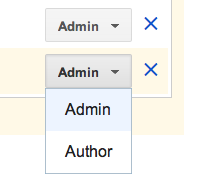
    Add as admin

Question:- How To Delete a Blog From your Blogger List?

Monday, 8 October 2012

Answer:-
1-Sign in to blogger.com and access your Blogger Dashboard.
2-Beside the blog you want to delete, click the drop-down menu to the right of the gray Post List iconBlogger post list icon & drop-down
3-Select Settings.
4-Click Other (under Settings) on the left side of the page..
5-At the top of the page under "Blog tools" click Delete blog.
6-Click Delete this blog.

    Question:-What is www.bloggers.com?

    Thursday, 30 August 2012

    Answer:-bloggers.com is a plateform where you can find a lot of persons having blogs
    you can connect to them by following them and also can add as friend.It is very good plate form where we can see many blog author connect them and can take tricks and help from them.You can also get a lot of traffic from this and make your blog popular.


    You Can Find Me At Bloggers-Vijay Singh

    Question:-How To add an Outer template to your Blog?

    Answer:-
    1-Search Blogger Tamplate On Google
    2-Download That Tamplate which are most suitable for your blog
    3-Extract Downloaded Zip File
    4-Login at www.blogger.com
    5-Click On Your Blog From your Blog List For Which You Want to store Tamplate
    6-Click On "Tamplate" in Left under New Post Button
    7-Click "Backup/Restore" Button near Setting button in Right side
    8-Make backup for your blog for safe future of blog by clicking on "Download Full Tamplate " Button
    9-Browse Your new Tamplate From Your Computer
    10-Click on "Upload" Button
    11-Then save this
    12-Finish

    Question:-How To Add Google Analytics To Your Blog?

    Answer:-Steps
    1-Login at www.google.com/analytics
    2-Click On "Admin" Button On Right At Google Analytic Bar
    3-give your account name in space bar
    4-Paste Url In Url space Bar
    5-Set Time Zone From Which Country You are
    6-Agree Google analytics Terms and conditions
    7-then click on "Submit Button"
    8-Copy Google Analytics Code Which You are Given For Your site
    9-Paste That Code In Your Blogger Html Before </head> tag and Save Your Tamplate.
    11-Click On "Save" Button on Google analytics Form 

    Question:-How To Post In Your Blogger Blog?

    Wednesday, 29 August 2012

    Answer:-Steps-
    1-Open Blogger.com
    2-Login With Your Id
    3-Click Your Blog In Your Blog List In Which You Want To Post
    4-Click On "New Post" Button
    5-Paste Your Tittle in Tittle Space Row
    6-Paste Your Description In Description Space
    7-Give A Lable To Your Post
    8-Click On "Publish" Button.

    Question:-how to make a blog on blogger easily?


    Answer:-steps to make a blog on blogger-
    1-open blogger.com
    2-sign in with your gmail id
    3-click on "New Blog" option
    4-Paste your tittle in tittle bar
    5-Choose a URL for your blog
    6-select a Template
    7-Click on the "create Blog" Button.