Question:-How to move a blogger blog from one account to another account?

Tuesday, 11 December 2012

Answer:-

  1. Sign in to Blogger with Account 1, which we'll assume is the account containing the blog.
  2. Go to the "Permissions" section under Settings | Basic tab.
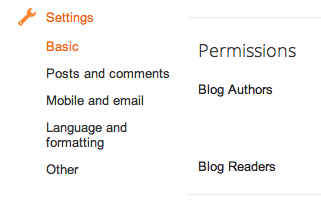
    Permissions section
  3. Click the Add Authors button and send an invitation to the owner of Account 2, the account to which you'd like to move the blog.
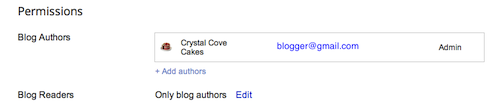
    Add authors
  4. Wait for the owner of Account 2 to accept the invitation. If you're sharing a computer, you'll need to sign out of Account 1 first, or each use a different browser.
  5. Once Account 2 has joined the blog, Account 1 can sign in again and go back to the Settings | Basic tab.
  6. Click the drop-down menu next to Account 2 and choose "Admin."
  7. Click the X next to Account 1 to remove Account 1.
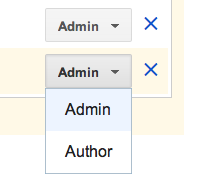
    Add as admin

Question:-Convert a .PHP File/URL/HTML File into PDF File?

Thursday, 6 December 2012

Answer:-http://pdfcrowd.com/

Question:-all about onpage seo?

Tuesday, 4 December 2012

Ans:-http://www.seolayman.com/2011/03/list-of-all-on-page-and-off-page-seo.html

Question:-How can you tell SEO information about any website?

Answer:-http://www.seoscheduler.com

Google Penguin Updates......

Wednesday, 10 October 2012


Latest update is Google panda #21 in november


Penguin 1: April 24, 2012 (3.1%)
Penguin 2: May 26, 2012 (less than 0.1%)
Penguin 3: Oct. 5, 2012 (0.3% english queries)

Page layout algorithm improvement

As we’ve mentioned previously, we’ve heard complaints from users that if they click on a result and it’s difficult to find the actual content, they aren’t happy with the experience. Rather than scrolling down the page past a slew of ads, users want to see content right away. So sites that don’t have much content “above-the-fold” can be affected by this change. If you click on a website and the part of the website you see first either doesn’t have a lot of visible content above-the-fold or dedicates a large fraction of the site’s initial screen real estate to ads, that’s not a very good user experience. Such sites may not rank as highly going forward.

Question:- How To Delete a Blog From your Blogger List?

Monday, 8 October 2012

Answer:-
1-Sign in to blogger.com and access your Blogger Dashboard.
2-Beside the blog you want to delete, click the drop-down menu to the right of the gray Post List iconBlogger post list icon & drop-down
3-Select Settings.
4-Click Other (under Settings) on the left side of the page..
5-At the top of the page under "Blog tools" click Delete blog.
6-Click Delete this blog.

    Convert Text/Notepad To PDF......

    Friday, 5 October 2012

    http://www.texttopdfconverter.com/